Bakery Photoshoot Guide for Cafés and Pastry Cases
A bakery photoshoot that keeps up with the bake schedule: photograph coffee, loaves, and case items once, then refresh menus and posts the same morning.
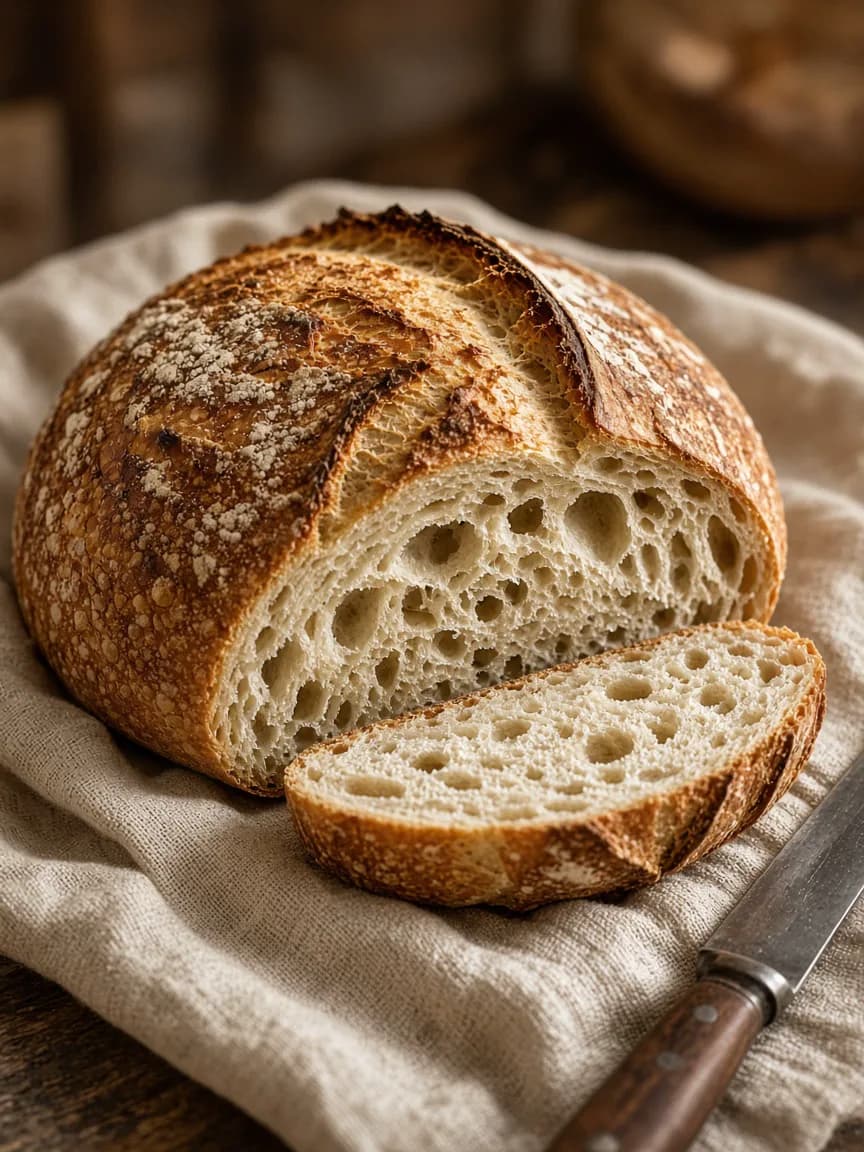
Run one short bakery photoshoot before the morning rush, keep a bright delivery version of each seller, and refresh specials the same day they launch.
A bakery photoshoot does not need a rental studio or a closed kitchen. It needs a repeatable window before the rush, when coffee foam, crust texture, and case items still look the way customers will see them at the counter.
Cafés and bakeries rarely lose sales because the food is unphotogenic. They lose sales because the case changed at 8 a.m. and the website still shows yesterday's tray. The bakery photoshoot exists to keep menus, delivery listings, and social posts aligned with what is actually for sale today.
Plan a bakery photoshoot around the bake schedule
Treat the shoot as production, not creativity on demand. Before you touch a camera, decide:
- Which five SKUs must look correct this week (not every item in the case).
- Which surfaces are allowed (one board, one counter zone, one window table).
- Who owns the fifteen-minute window before peak service.
- Which destinations need exports today: menu PDF, delivery app, Instagram, stories.
A practical bakery photoshoot list for most cafés includes a signature latte, one hero bread, one laminated pastry, one savory plate, and one seasonal special. That set covers recognition, ordering, and same-day promotions without turning the morning into a photo event.
When those heroes also need print or QR menus, run the raw captures through the menu photo editor so each dish gets a destination-ready crop instead of forcing one square image into every channel.
What to photograph first
Prioritize the items that create recognition and revenue:
- Signature coffee drinks with readable foam or texture.
- Hero breads and laminated pastries.
- Top-selling sandwiches or breakfast plates.
- Rotating case items that need a same-day post.
- Clean delivery versions of every item sold on apps.
A latte, a sourdough loaf, a croissant, and one savory breakfast plate will outperform a folder full of one dessert style.
Morning light is your studio
Most cafés already have the best light of the day before the rush:
- Choose one window-side surface and keep it clear.
- Set a neutral board, linen, or clean counter as the default background.
- Shoot drinks first while foam and ice still look fresh.
- Shoot breads and pastries next while crusts are at their best.
- Finish with sandwiches or plated items that can wait a few minutes.
Fifteen focused minutes beats an interrupted hour during peak service.
Case photography versus single-item heroes
A full pastry case photo is useful for atmosphere. It is usually weak for menus and delivery because individual items disappear.
Use both:
- Case or counter scene for brand and storefront storytelling.
- Single-item heroes for menus, delivery apps, and product posts.
When in doubt, shoot the single item. Marketplaces and menus need product clarity.
Coffee-specific tips
- Fill the cup to the real serving level.
- Keep latte art readable from above or a slight angle.
- Avoid heavy filters that turn milk gray or brown.
- Include the saucer or sleeve only if customers actually receive it.
Coffee photos fail when they become abstract brown circles. Texture and foam geometry do the selling.
Bread and pastry tips
- Show crust texture and crumb when the cut is part of the appeal.
- Keep powdered sugar, seeds, and glaze natural rather than overbuilt.
- Photograph one hero per SKU instead of overcrowding the frame.
- Maintain consistent color so the whole bakery looks like one brand.
Same-day publishing workflow
| Asset | Destination | Speed target |
|---|---|---|
| Bright single-item photo | Menu / delivery | Same morning |
| Atmospheric cafe photo | Instagram feed | Same day |
| Vertical promo | Stories / Reels cover | Same day |
| Caption + offer | All channels | Before the item sells out |
If the almond croissant is gone by 11, the post needs to be ready by 9.
Where AI helps after the bakery photoshoot
AI editing is useful when you already photographed the real pastry or drink and need cleaner light, a less cluttered counter, or another social format. It is not a substitute for photographing today's bake if the product changes daily.
FoodPostStudio is built for that refresh loop: upload the real item from your bakery photoshoot, choose the destination, and create publishable variations while the case is still full. For menu-specific exports, finish in the menu photo editor so print, delivery, and QR surfaces stay consistent with the same source photo.
Frequently asked questions
How long should a bakery photoshoot take?+
Most independent cafés and bakeries can finish a useful bakery photoshoot in fifteen to thirty focused minutes when one surface, one window, and one shot list are already decided.
What should you photograph first in a bakery photoshoot?+
Start with drinks while foam and ice are fresh, then breads and pastries while crusts look best, and finish with plated sandwiches or breakfast items that tolerate a short wait.
Can a bakery photoshoot work with only a phone?+
Yes. A clear phone photo is enough for menus, delivery tiles, and social posts when light is consistent and each SKU is photographed as a single hero instead of a crowded case shot.
How do bakery photoshoot images differ for menus and Instagram?+
Menus and delivery need bright single-item heroes with honest portions. Instagram can use slightly more atmosphere, but the same real pastry or drink should remain recognizable in every crop.
When should a bakery photoshoot become a weekly habit?+
Bake daily or rotate case items frequently should treat a mini bakery photoshoot as a weekly rhythm tied to service, not a quarterly studio day.
Create menu and social variations for coffee, bread, and pastry without waiting on another shoot day.